
Monitoring Coverage
Ensure your projects have sufficient API and Endpoint monitoring in place with Coverage Checks.
Monitoring Coverage is a Conformance setting that tracks what percentage of your configured API Calls and unique server endpoints are actively being monitored by APImetrics. The higher the coverage percentage, the more complete your monitoring — ensuring issues are caught across your full API surface, not just a subset of it.
API Call Coverage vs. Endpoint Coverage
APImetrics distinguishes between two types of coverage:
- API Call Coverage refers to the percentage of API Calls configured in your project that are currently being monitored.
- Endpoint Coverage refers to the percentage of unique server endpoints — defined by their method, host, and path that are being monitored. Since a single endpoint can be called from multiple API Calls within a project, endpoint coverage gives you a distinct view of how much of your actual API surface area is covered.
Enabling Monitoring Coverage Checks
To configure Monitoring Coverage for a project:
- From the left-hand navigation, select Conformance.
- Go to the Settings tab.
- Scroll down to the Manage Monitoring Coverage section.
- Toggle Enable Coverage Checks to ON.
- Enter your desired threshold percentages for API Call Coverage and Endpoint Coverage.
- Click Save.
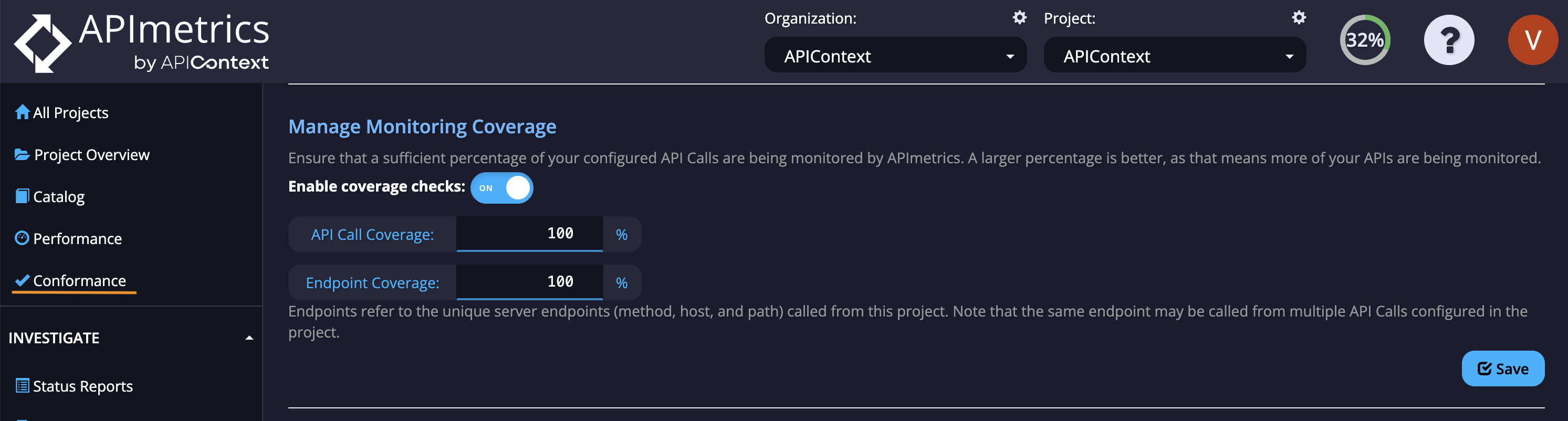
Coverage checks apply at the project level. Each project can have its own coverage thresholds configured independently.
Setting Your Coverage Thresholds
If all endpoints in your project are being monitored, set both API Call Coverage and Endpoint Coverage to 100%. Otherwise, enter the values that reflect your project's monitoring configuration.
Not Sure of Your Coverage Percentages?
If you're unsure what percentage of your API Calls or endpoints are currently being monitored, the recommended approach is:
- Leave both API Call Coverage and Endpoint Coverage at 100% (the default values).
- Run a Conformance check using the Evaluate Most Recent Calls button on the Conformance Summary page.
- The check will likely return a fail — but the Issue Details tab will display the actual current coverage percentages for your project.
- Return to Conformance > Settings > Manage Monitoring Coverage and update the API Call Coverage and Endpoint Coverage fields with those values.
- Click Save.
This approach lets APImetrics surface the real coverage data from your project, so you can set accurate and meaningful thresholds.
For more information on reviewing conformance failures, see Issue Details.
Updated 5 months ago